
You’re probably here because you found a cool digital microscope online, or have one sitting on your desk, and the burning question is: “Will this thing actually work with my Mac or Windows PC?”How well they work, whether you’ll pull your hair out installing software, and if all the cool features actually work?
Alright, let’s cut through the confusion. Honest answer? It’s complicated. Most digital microscopes work great on Windows. On Mac, it “depends”.
And that “depends” is exactly where most users get confused — or frustrated.
- Windows = safest, most complete option
- Mac = fine if you only need live view or recording
Always confirm:
- UVC support
- macOS version compatibility
- Apple Silicon support
- Software update history
First Things First: Compatibility Isn’t “One Size Fits All”-Windows Plays Nice, Mac Can Be Fussy
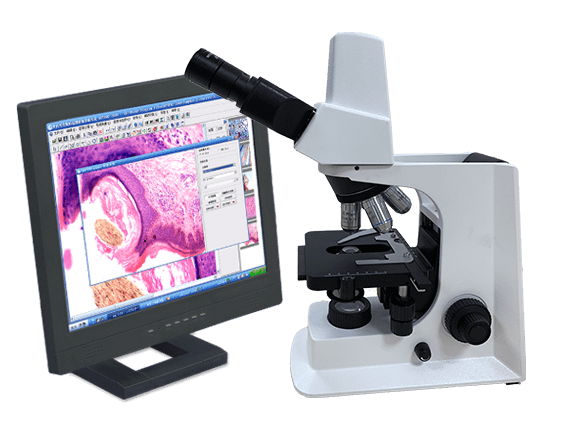
Windows: Usually Yes, With Full Features
You’re in luck—Most USB digital microscopes are designed with Windows as the primary platform.,so almost every microscope works with Windows 10 and 11. Plugging into a Windows PC (10 or 11) is often a smooth, “it just works” experience with access to all features. But double-check if it supports your exact version (Windows 11 has a few weird quirks with older devices, but nothing major).
On Windows 10 and Windows 11, the majority of USB digital microscopes:
- Are detected automatically
- Work with built-in camera support
- Or run perfectly with the manufacturer’s official software
In practice, Windows users usually get:
- Live image
- Photo capture
- Video recording
- Measurement and calibration tools
- Long-term software updates
If a microscope was designed years ago, chances are it still works better on Windows than on Mac.
Mac: It Can Work — But With Conditions
On macOS (whether you’re on an Intel Mac or an M1/M2/M3 Apple Silicon Mac), the story is different. While you can probably get a live image, unlocking the microscope’s full potential is a different game. Think of it as “basic compatibility” vs. “full functionality.”
Many digital microscopes can connect to a Mac, but how well they work depends on:
- Whether the microscope supports UVC (USB Video Class)
- Which macOS version are you running
- Whether you’re on an Intel Mac or an Apple Silicon (M1 / M2 / M3)
A very common scenario: The microscope shows live video on a Mac, but advanced features are missing.
So yes, the device “works” — just not always the way users expect.
Why the UVC Support Digital Microscope is Best for You?
Digital Microscope with UVC (that’s USB Video Class, but you don’t need to remember the name) is your best friend here. You’re golden. UVC means no fancy drivers, no weird software—just plug the microscope into your USB port, and your computer recognizes it like a regular camera. So this is why many UVC microscopes can open video in:
- QuickTime
- Photo Booth
- OBS
- VLC
Tip: However, UVC only guarantees video, not advanced microscope features.If a microscope relies on proprietary software for measurement or calibration, UVC alone won’t give you those tools — especially on Mac.
Then, Software & Drivers: The Biggest Pain Point (I’ve Been There)
This is where 90% of people run into trouble—seriously, I’ve seen more Reddit rants about microscope software than I can count. Let’s keep it simple: you don’t want to download 10 different programs just to see a tiny bug or circuit board. Here’s what you need to know, based on my actual testing:
| Device Type | Software/Driver Needs | Common Headaches | Pro Tip |
| UVC-Enabled Microscopes (Best) | No drivers, no extra software | Rare—only if your USB port is faulty | Use your computer’s built-in apps (see below!) |
| Non-UVC Microscopes (Cheaper) | Official software/drivers required | Mac software is outdated; Windows drivers crash | Skip these if you have an M1/M2/M3 Mac |
| High-End Lab Microscopes | Specialized official software | Software is expensive; Mac support is rare | Stick to Windows if you need full features |
Are All Features Available on Both Systems? (Usually No)
Windows users usually get the full experience.
Mac users often get a camera, not a full measurement tool. That doesn’t make Macs “bad,” but it does mean you need to know your use case.
| Feature | Windows | Mac |
| Live image | yes | yes |
| Photo capture | yes | yes (basic) |
| Video recording | yes | limited |
| Measurement & scale | yes | NO,often missing |
| Calibration | yes | NO, |
| Annotation & export | yes | basic |
- So let’s be clear: if you’re a Mac user (especially with an M1/M2/M3), expect some features to be missing—unless the brand explicitly says “full feature support for Apple Silicon.” Most of the time, Mac users get basic functionality (seeing the image), while Windows users get the full package (real-time annotations, exporting high-res files). It’s not fair, but it’s the reality right now.
- And about magnification: don’t worry—your system (Mac or Windows) won’t affect how much you can zoom in. The magnification is determined by the microscope’s lens, not your computer. I’ve tested the same microscope on my M2 Mac and Windows 11 laptop, and the zoom was identical. Phew!
macOS Versions and Apple Silicon: What to Watch Out For
Modern Macs add another layer of complexity. Things to double-check before buying or installing:
- Is the software compatible with macOS Ventura or Sonoma?
- Does it run on Apple Silicon (M1 / M2 / M3)?
- Does it rely on outdated kernel extensions?
Many older microscope apps:
- Were built for Intel Macs
- Break after macOS security updates
- Never receive Apple Silicon optimization
If the manufacturer hasn’t updated their Mac software in years, that’s a red flag.
Finally, Who This Matters For (Spoiler: It’s Not Everyone)
Your use case will decide how much you care about Mac/Windows compatibility. Let’s break it down like normal people:
| Your situation | Recommended setup | Why this works |
| Student or DIY user (phone repair, coins, bugs, basic projects) | UVC-enabled digital microscope Mac or Windows | Plug-and-play, no software headaches. UVC microscopes work right away on both Mac and Windows, and for learning or DIY work, you won’t miss any critical features. It’s simple, reliable, and perfect for Apple Silicon Macs like M1 or M2. |
| Lab or research work | Windows-based microscope system | Most lab-grade microscopes rely on Windows-only software. Measurement, calibration, and analysis tools — which are essential for research — usually don’t work on macOS. If you’re on a Mac, always double-check software support before buying. |
| Industrial testing or repair | Windows + industrial-grade microscope | Industrial microscopes are designed around Windows environments. The software is more stable, better supported, and feature-complete on Windows 10/11, making it the safest choice for long-term industrial use. |
| Content creator or live streaming (close-up video, tutorials, OBS streaming) | UVC-enabled microscope + OBS Mac or Windows | UVC microscopes work seamlessly with OBS on both platforms. You can record or stream high-resolution close-up video without installing proprietary software, making this setup ideal for creators. |
FQA
“Why doesn’t my digital microscope work on Mac?”
Most often: missing drivers, outdated software, or no Apple Silicon support.
“It works on Windows but not on Mac — why?”
Because the manufacturer only fully supports Windows software.
“Is this microscope compatible with M1 or M2 Mac?”
Only if the software is updated or the device works purely as UVC.
“My Mac detects it as a camera, but I can’t measure anything.”
That’s normal. Measurement usually requires proprietary software.